
Sdílej článek:
Pi App Studio nyní nabízí novou funkci, která tvůrcům umožňuje stahovat kód svých aplikací i nahrávat vlastní kód, a to spolu s řadou aktualizací, které zlepšují celkovou zkušenost tvůrců i uživatelů.
Obsah článku
Odhadovaná doba čtení: 7 minut
Přehled audio a video [Čeština]
Přehled audio a video [Angličtina]
Pi App Studio nyní nabízí novou funkci
App Studio zůstává produktem zaměřeným na usnadnění vytváření, nasazování a spouštění online aplikací netechnickými lidmi. Tato nová funkce však nabízí možnost a flexibilitu pro úpravu aplikací na úrovni kódu.
Tato aktualizace také činí App Studio užitečnějším pro technické vývojáře, kteří mohou pomocí Pi App Studio rychle vytvářet prototypy aplikací a následně pokračovat ve vývoji na základě těchto prototypů. Vzhledem k tomu, že App Studio zjednodušuje integraci Pi a nasazení aplikací, mohou vývojáři ušetřit čas a soustředit se na tvorbu svých skutečných produktů.
Správa aplikací
Pi App Studio také představilo další funkce, díky nimž je vytváření aplikací organizovanější, přístupnější a intuitivnější. Patří mezi ně nové rozhraní pro správu, nové možnosti pro správu aplikací, vylepšení stránky „Moje aplikace“, obecné aktualizace uživatelského prostředí a další.
Toto je součástí pokračujícího úsilí o poskytnutí nástrojů s podporou umělé inteligence průkopníkům a vývojářům pro tvorbu aplikací a utilit v ekosystému Pi.
Stahování a nahrávání kódu
Nová funkce stahování/nahrávání kódu představuje pro Pi App Studio krok vpřed v propojování zkušeností tvůrců a vývojářů. Tvůrci si mohou stáhnout zdrojový kód aplikací, které vytvořili prostřednictvím Pi App Studio, provádět úpravy lokálně a poté znovu nahrát upravenou verzi přímo zpět do App Studia. Tvůrci pak mohou pomocí App Studia pokračovat v provádění dalších revizí. To otevírá hlubší kreativní kontrolu – ať už jde o vylepšování funkcí, personalizaci uživatelského rozhraní nebo cokoli jiného.
Flexibilita
Tato flexibilita umožňuje hybridní vývojové pracovní postupy: tvůrci mohou používat vestavěné nástroje Pi App Studia k vytváření aplikací bez nutnosti technického zpracování a poté je revidovat v jiných vývojových prostředích, pokud k nim přizvou další technické spolupracovníky nebo se sami naučí programovat. Tvůrce může například vytvořit aplikaci prostřednictvím Pi App Studia, exportovat kód pro doladění konkrétní funkce nebo přidat specifické návrhy, které lze vyvíjet mimo App Studio, a poté znovu nahrát doplněnou verzi zpět do Pi App Studia, aby mohl pokračovat ve své tvorbě netechnickým způsobem – to vše při zachování kompatibility s ekosystémem Pi.
Export / Import kódu
Možnost stahování/nahrávání kódu také rozšiřuje užitečnost Pi App Studia pro technické vývojáře. Vývojáři mohou App Studio použít k vytvoření prototypu aplikace a exportovat kód mimo App Studio, aby mohli pokračovat v dalším vývoji. Mohou také nahrát existující kód aplikace s určitými požadavky na kompatibilitu do App Studia, aby mohli těžit z možností App Studia a jednoduchosti integrace a nasazení aplikací Pi do ekosystému Pi. Obě cesty by vývojářům umožnily soustředit se na tvorbu svého produktu spíše než na logistiku – což by urychlilo celkové tempo vývoje a nasazení aplikací Pi v ekosystému.
Tyto funkce společně přibližují Pi App Studio všestranné platformě pro tvorbu a vývoj aplikací Pi a umožňují průkopníkům a vývojářům škálovat tvorbu a nasazení aplikací způsobem, který přesahuje rámec šablon, a vytvářet vlastní nástroje, které si představují a které se bezproblémově integrují do celého ekosystému Pi.
Podívejte se na demo funkce a uvidíte, jak funguje:
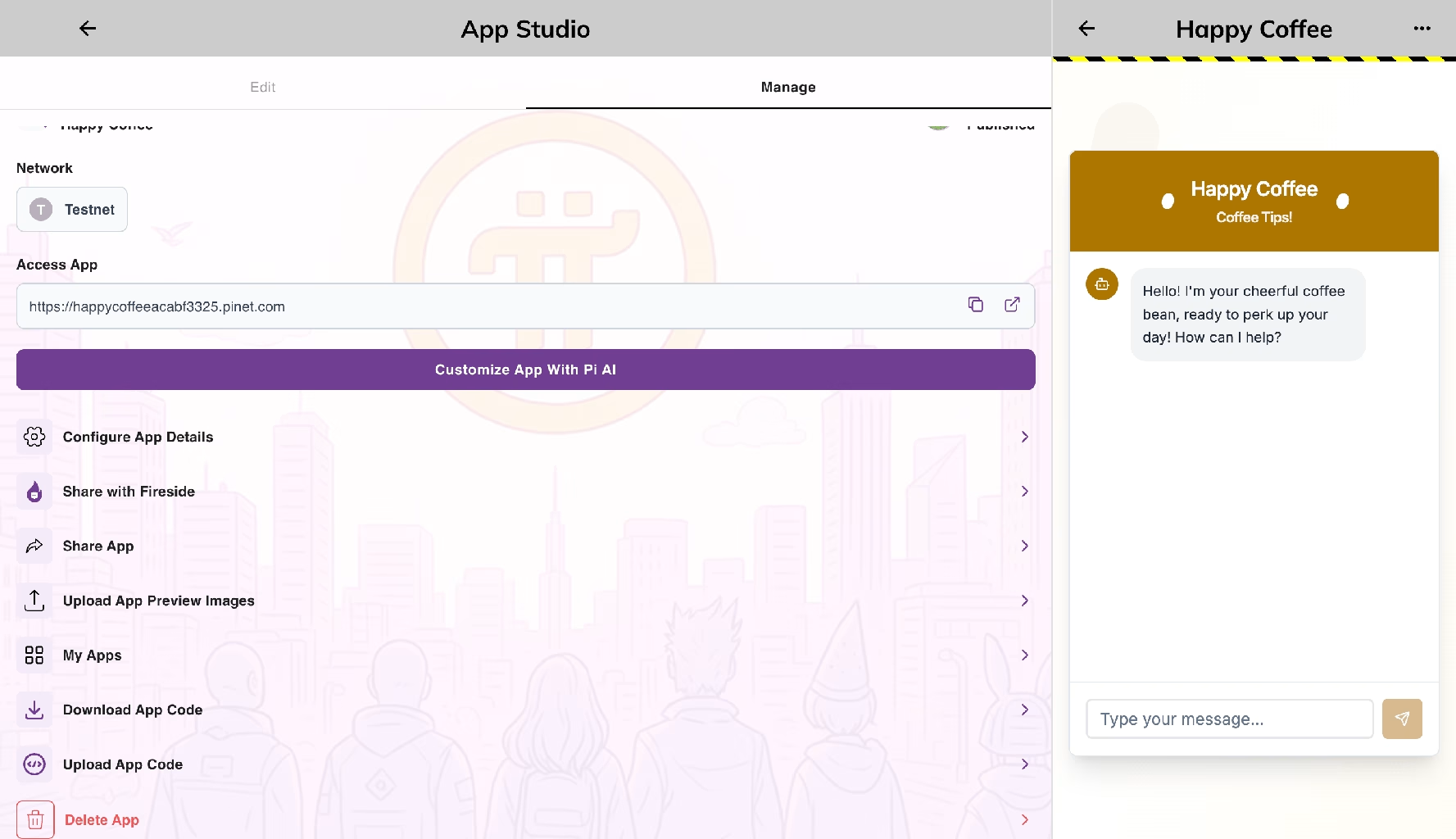
Rozhraní pro správu aplikací
Tvůrci mají přístup ke stránce pro správu svých individuálních aplikací. Ta zahrnuje obecné možnosti úprav a sdílení aplikací a také nové funkce, jako je například umožnění tvůrcům:
- Nahrajte náhledové obrázky pro popis aplikace v ekosystémovém rozhraní v prohlížeči Pi nebo PiNetu, což pomůže tvůrcům lépe prezentovat jejich aplikace a přilákat více uživatelů;
- Sdílejte odkaz na své aplikace s logem aplikace jako miniaturou v kanálu Fireside Forum Pi App Studio. To pomůže propagovat přítomnost jejich aplikací v komunitě a přijmout je uživateli.
- Smazat aplikaci, což dříve tvůrci nemohli, jim umožňuje udržovat si rozhraní pro tvůrce čisté, organizované a aktuální.
Vylepšení stránky Moje aplikace
Řazení a vyhledávání
Stránka Moje aplikace nyní obsahuje možnosti řazení a vyhledávání , které tvůrcům pomáhají snadno vyhledávat a spravovat aplikace při vytváření dalších projektů.

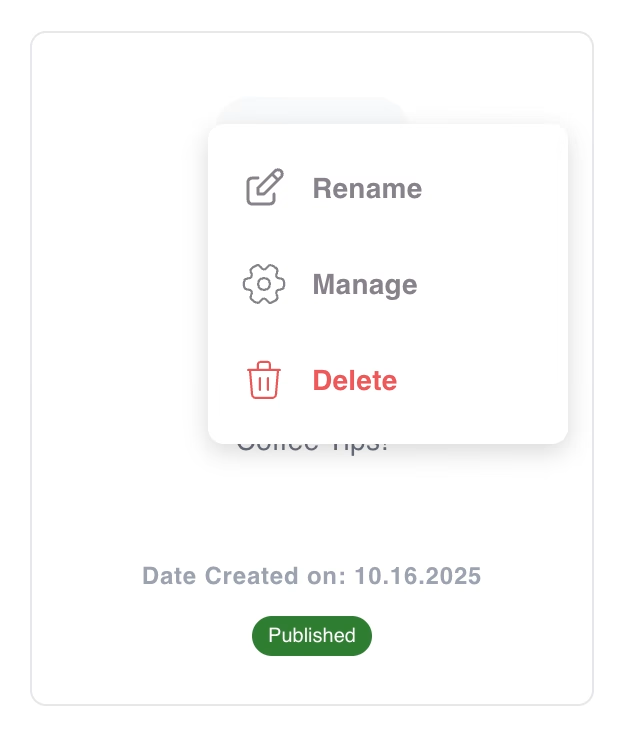
Rolovací nabídka
Aplikace na stránce Moje aplikace mají rozbalovací nabídku , která tvůrcům umožňuje aplikaci přejmenovat, spravovat nebo smazat.
Obecné aktualizace
- Tvůrci si mohou zvolit, kolik jednotek Pi chtějí přidat (až 100 jednotek Pi) pro použití v Pi App Studio. To zlepšuje zážitek z tvorby, protože dříve bylo možné načíst pouze jednu jednotku Pi najednou.
- Limit pro vytváření aplikací byl zvýšen z 10 na 100, což umožňuje více iterací, kreativitu a rozmanité nástroje.
- Celková vylepšení uživatelského rozhraní a uživatelské zkušenosti zlepšila design, rozhraní a uživatelský zážitek aplikace App Studio . Například tvůrci nyní mohou správně upravovat chatboty po přizpůsobení aplikace pomocí Pi AI, což bylo dříve zakázáno.
Vytvářejte a používejte aplikace Pi App Studio!
Průkopníci jsou povzbuzováni k tvorbě aplikací prostřednictvím Pi App Studio, ke kterému lze přistupovat v prohlížeči Pi nebo v aplikaci Pi Desktop.
Díky řízeným pracovním postupům pro tvorbu aplikací s pomocí umělé inteligence a nové funkci stahování/nahrávání kódu mohou tvůrci jakékoli technické úrovně využít App Studio k vytváření a nasazení skutečných aplikací a produktů v ekosystému Pi. Chcete-li prozkoumat aplikace App Studio, které již komunita nasadila, mohou Průkopníci přejít na kartu Aplikace Pi v prohlížeči Pi a klepnout na tlačítko App Studio.
Souvísející články …

Pi Network
Oznámení o Pi Network
Pi Network je kryptoměnový projekt založený na blockchainu, jehož cílem je umožnit uživatelům těžit mince Pi pomocí chytrých telefonů. Cílem projektu je propagovat přijetí kryptoměn.
Projekt spustili doktorandi na Stanfordské univerzitě v roce 2019. Pi Network nabízí uživatelům jednoduchý a ekologický způsob těžby mincí Pi pouhým otevřením aplikace a stisknutím tlačítka jednou denně.
Jednou z funkcí sítě Pi je, že uživatelé mohou zvýšit rychlost těžby rozšířením své sítě. Síť Pi si navíc klade za cíl zvýšit hodnotu mincí Pi tím, že uživatelům umožňuje vytvářet a používat webové aplikace na platformě Pi.
Pi Network v současné době spouští svou hlavní síť. Chcete-li se k Pi Network připojit, musíte si stáhnout mobilní aplikaci a zadat pozvánkový kód. Pi Network je inovativní projekt, jehož cílem je připravit cestu pro budoucnost kryptoměn.
Jak se zúčastnit Pi Network
Pokud nejste členem sítě Pi Network, můžete začít během 5 minut kliknutím na tento odkaz. Registrací pomocí mého referenčního kódu jwkkbiz můžeme vydělávat Pi oba. Pi Network je aplikace, která vám umožní snadno těžit kryptoměnu „Pi“ ve vašem smartphonu. Stisknutím tlačítka jednou denně spustíte těžbu na 24 hodin, i když necháte telefon nečinný. V roce 2024 jsem těžil 360 dní v roce a ti, kteří přijali pozvání, získali mnoho výhod. Pokud se zaregistrujete pomocí referenčního kódu jwkkbiz, získáte 25% zvýšení rychlosti těžby.
Po 30 těžbách projdete KYC (Know Your Credit), proto nezapomeňte při registraci zadat své skutečné jméno. Pokud se zaregistrujete nesprávně, ztratíte 20 % jako pokutu.
Podrobnější informace a důvody registrace naleznete zde.
Mohlo by se vám také líbit:
- Free shares worth up to €100 on Trading 212
- Pi Network a „314 159 USD hodnota“: Největší hoax v historii projektu
- Kde externě sledovat, poslouchat a číst PiBazar.eu
- Chytré smlouvy a Pi Network: Automatizace důvěryhodnosti pro budoucnost Web3
- Vše o Operaci liquidity_pool_deposit na Pi Network
- Fast Track KYC umožňuje pro nové uživatele dřívější aktivaci peněženky pro účast v ekosystému Pi Network
- Pi Reklamy – Pi Ads v apps – obecně
- Pi Network Pi SDK: Stručný přehled – začátečník
Zanechat odpověď